Repository navigation
[iOS][Fabric] ScrollView: a frame change during a drag resets an overscrolled contentOffset #59993
Description

Description
When a ScrollView's frame changes while a finger holds the content pulled past the top, contentOffset.y is set to 0. The next pan update restores about half of the pull. If the layout resizes the scroll view several times during one drag, the content jumps toward the top at each resize and the pull falls behind the finger. In the log below, one resize takes onScroll from −32.3 to 0.0, and the next pan update 12 ms later reports −16.7; the finger stays down throughout.
The bottom end behaves the same way: when the scroll view grows, an overscrolled offset is set to the new maximum (946.0 → 858.0). Inside the normal scroll range nothing jumps. If the content size changes instead of the frame, the offset is kept (−43.0 → −43.7); the switch in the reproducer selects that case.
The write comes from UIKit. The mount sets the bounds of RCTScrollViewComponentView, autoresizing sets the frame of the inner RCTEnhancedScrollView, and -[UIScrollView setFrame:] calls _adjustContentOffsetIfNecessary, which sets the offset to (0, 0) (backtrace below). The content-size path already guards against this: updateState: sets contentSize inside _preserveContentOffsetIfNeededWithBlock:, whose comment says it "disables programmatical changing of ScrollView's contentOffset if a touch gesture is in progress". The frame path is not wrapped: -[RCTEnhancedScrollView setFrame:] calls super as is.
Expected: a frame change during a drag keeps the offset, as a content-size change does.
This came up in an app whose layout follows the keyboard while keyboardDismissMode="interactive" drags it down: the scroll view gets a new height on every frame. The reproducer uses a timer instead.
Reproduced on 0.88.1 and on 0.89.0-rc.1 (a local copy of the reproducer with the rc's packages), New Architecture, iPhone 18 Pro simulator on iOS 27.2. All runs were driven by an AI agent; the drags are XCTest-synthesised pans. Not checked: a physical device, a finger that stops completely mid-drag, the old architecture.
Steps to reproduce
- Clone the reproducer. In
ReproducerApp:yarn install,bundle install,(cd ios && bundle exec pod install),yarn ios. - The footer under the list changes its height between 80 and 140 every second. This changes the height of the
ScrollViewabove it. - With the list at the top, pull it down slowly and keep the finger down for a few seconds. The top line shows a negative
yandfinger down. - Each time the footer changes height, the list jumps toward the top. The log shows
scroll y 0.0, then about half of the value before. - Turn on "resize content instead (control)" and repeat step 3. The spacer at the end of the content now changes height instead of the footer. The offset is kept.
React Native Version
0.88.1
Affected Platforms
Runtime - iOS
Output of npx @react-native-community/cli info
System:
  OS: macOS 27.2
  CPU: (10) arm64 Apple M1 Max
  Memory: 474.95 MB / 32.00 GB
  Shell:
    version: "5.9"
    path: /bin/zsh
Binaries:
  Node:
    version: 26.13.1
    path: /opt/homebrew/bin/node
  Yarn:
    version: 1.22.22
    path: /opt/homebrew/bin/yarn
  npm:
    version: 11.20.0
    path: /opt/homebrew/bin/npm
  Watchman: Not Found
Managers:
  CocoaPods:
    version: 1.17.0
    path: /opt/homebrew/bin/pod
SDKs:
  iOS SDK:
    Platforms:
      - DriverKit 27.2
      - iOS 27.2
      - macOS 27.2
      - tvOS 27.2
      - visionOS 27.2
      - watchOS 27.2
  Android SDK:
    API Levels:
      - "36"
      - "36"
      - "37"
    Build Tools:
      - 35.0.0
      - 36.0.0
      - 37.0.0
    System Images:
      - android-36.1 | Google Play ARM 64 v8a
    Android NDK: Not Found
IDEs:
  Android Studio: 2026.1 AI-261.25134.95.2612.15822958
  Xcode:
    version: 27.2/27B52
    path: /usr/bin/xcodebuild
Languages:
  Java:
    version: 17.0.19
    path: /opt/homebrew/opt/openjdk@17/bin/javac
  Ruby:
    version: 4.0.5
    path: /opt/homebrew/bin/ruby
npmPackages:
  "@react-native-community/cli":
    installed: 20.2.0
    wanted: 20.2.0
  react:
    installed: 19.3.0
    wanted: 19.3.0
  react-native:
    installed: 0.88.1
    wanted: 0.88.1
  react-native-macos: Not Found
npmGlobalPackages:
  "*react-native*": Not Found
Android:
  hermesEnabled: true
  newArchEnabled: true
iOS:
  hermesEnabled: true
  newArchEnabled: true
Stacktrace or Logs
App log around one footer change (ms timestamp, event, value). "drag begin" came 2.4 s before
the first line and "drag end" 5.2 s after the last one.

1794571064888 scroll y -32.0
1794571064909 scroll y -32.3
1794571064910 flip footer (frame) 80
1794571064910 scroll y 0.0
1794571064922 scroll y -16.7
1794571064938 scroll y -17.0

Offsets around the other footer changes of the same drag (before -> at the change -> next event):
 -6.7 -> 0.0 ->  -3.3
-23.0 -> 0.0 -> -11.3
-40.3 -> 0.0 -> -21.0
-41.3 -> 0.0 -> -21.0
-39.0 -> 0.0 -> -20.3
-34.3 -> 0.0 -> -17.3

Control (content size changes, frame does not), last value before -> first value after each change:
-16.3 -> -17.0
-43.0 -> -43.7
-69.7 -> -70.0
-93.3 -> -93.7

Backtrace of the write (lldb, breakpoint on -[RCTEnhancedScrollView setContentOffset:] with new y == 0;
isTracking == YES, contentOffset before the call {0, -14}):

frame #0:  React`-[RCTEnhancedScrollView setContentOffset:]
frame #1:  UIKitCore`-[UIScrollView _adjustContentOffsetIfNecessary] + 68
frame #2:  UIKitCore`-[UIScrollView setFrame:] + 444
frame #3:  React`-[RCTEnhancedScrollView setFrame:] + 104
frame #4:  UIKitCore`-[UIView(Geometry) _resizeWithOldSuperviewSize:] + 708
frame #5:  UIKitCore`-[UIScrollView(_UIOldConstraintBasedLayoutSupport) _resizeWithOldSuperviewSize:] + 52
...
frame #8:  UIKitCore`-[UIView(Geometry) resizeSubviewsWithOldSize:] + 96
frame #9:  UIKitCore`-[UIView(Geometry) setBounds:] + 468
frame #10: React`-[UIView(ComponentViewProtocol) updateLayoutMetrics:oldLayoutMetrics:] + 524
frame #11: React`-[RCTViewComponentView updateLayoutMetrics:oldLayoutMetrics:] + 100
frame #12: React`-[RCTScrollViewComponentView updateLayoutMetrics:oldLayoutMetrics:] + 76
frame #13: React`RCTPerformMountInstructions(...) + 2180
...
frame #22: React`-[RCTMountingManager performTransaction:] + 588
MANDATORY Reproducer
https://github.com/Elehiggle/rn-scrollview-frame-change-repro (the report was made at commit 605fc90; only ReproducerApp/App.tsx differs from the template)
Screenshots and Videos
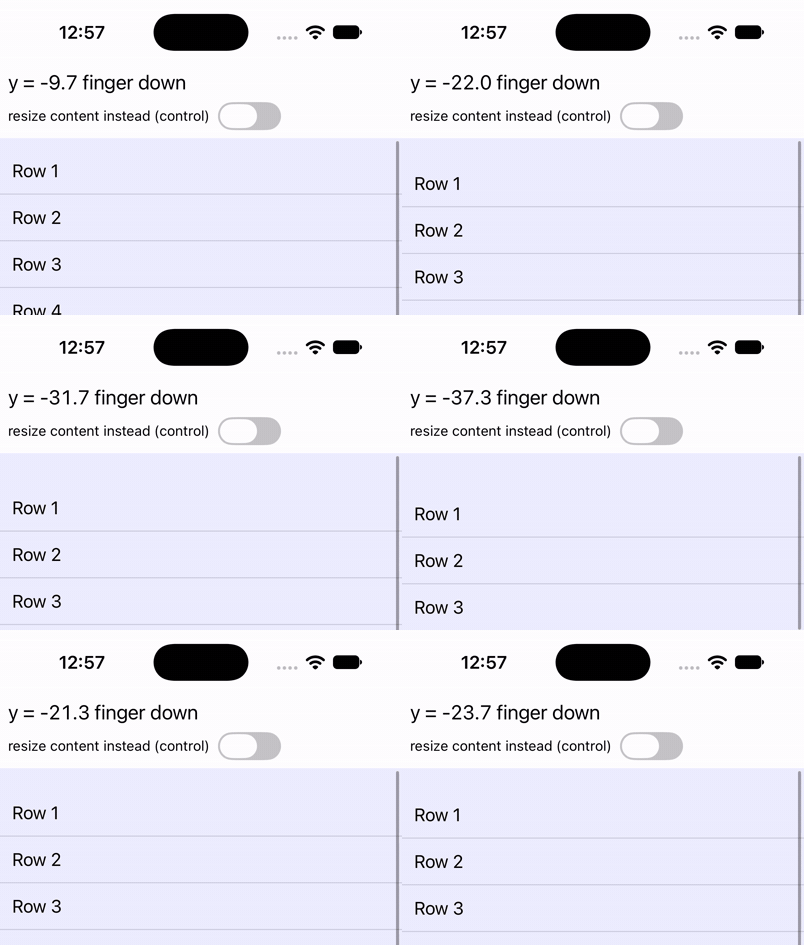
The top of the screen during one drag. The list is pulled down from the top; at each footer change it jumps toward the top. The clips show no touch indicator; the finger down label marks the drag.
Control, with the content size changing instead of the frame:
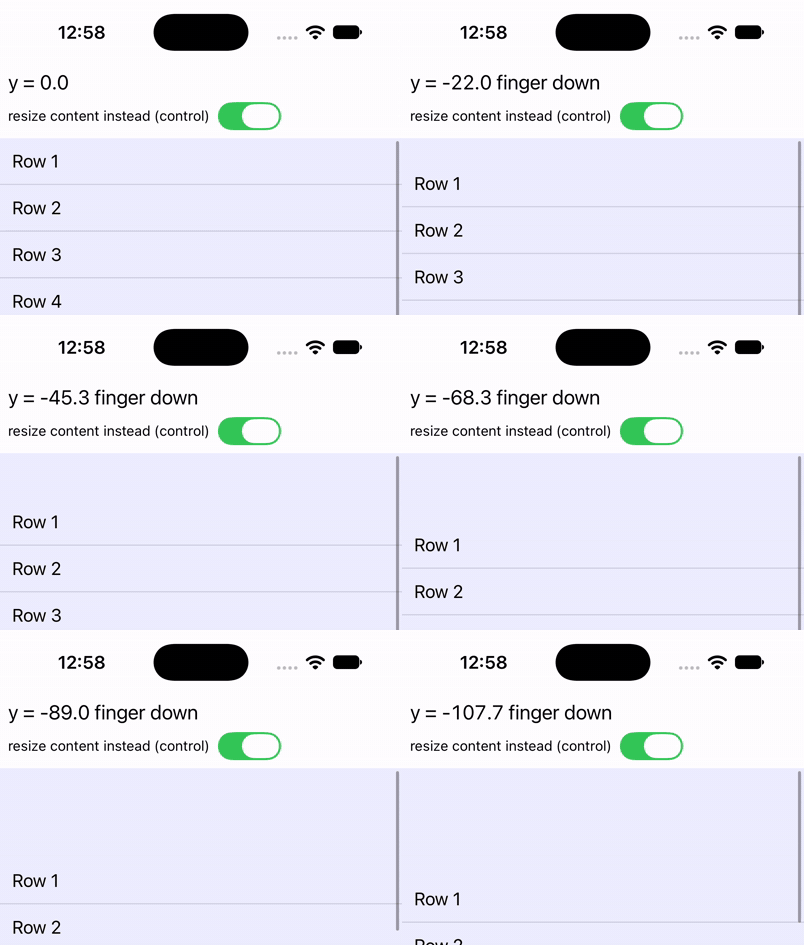
Full-screen clips: frame change, control.
Activity